
















How to Get Started with Beacon on HOVERAir X1
|
|
Time to read 10.657777777777778 min
|
|
Time to read 10.657777777777778 min
Table of contents
Starting today, your HOVERAir X1 just got a major upgrade — now compatible with Beacon. With the latest firmware update, you can unlock a whole new level of control and flexibility, including:
Manual Pairing Tip: If pairing doesn't occur automatically, press and hold both the Function (Fn) and Power buttons on the drone for 3 seconds to start manual pairing.
Once connected, the Beacon’s display will show your X1’s name — simply tap to complete the connection.
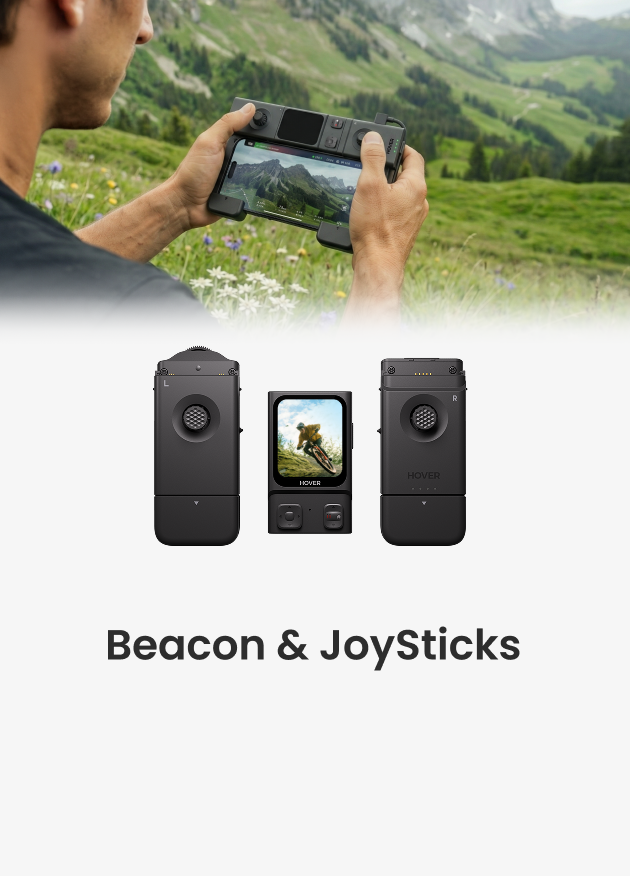
For a richer one-handed motion controller or two-handed full-featured controller experience, install the Joysticks (A or B) onto the Beacon, switch the mode to Manual Control , and enjoy responsive remote operationUnlock full remote control with two unique controller styles:
To enable manual control:
*Smartphone display support will be available in the next OTA update.
| Features | Description |
| Patented Tri-state Modular design | Three distinct control modes. |
| Real-time Monitoring | The 1.78" OLED display lets you monitor footage on the go. |
| Flexible Settings | In‑flight adjustment of parameters; reclaim control at any point during automatic modes. |
|
One-handed motion controller |
Snap the Beacon onto the right Joystick for a one-handed motion controller that's easy to use and fun to fly. |
| Two-handed motion controller |
Transform the Beacon into a full-featured two-handed remote controller for more accurate control.* *Smartphone display support will be available in the next OTA update. |
| Attach it Anywhere | Effortlessly attach your Beacon to your handlebars or clothing with our official accessories.(Beacon Wrist Strap, Magnetic Clip etc.). |
| Noise-cancellation sound recording |
Supports sound recording with crystal-clear audio and advanced noise reduction (coming in next release). |
| Operation / Feature | HOVERAir X1+Beacon&Joysticks | HOVERAir X1 PRO/PROMAX+Beacon&Joysticks |
| Real-time Monitoring | Yes | Yes |
| Maximum transmission range | 50m | 1km |
| Maximum flight altitude | 10m above ground level | 120m above ground level |
| Flight mode selection | Yes | Yes |
| Camera parameter adjustment | Yes | Yes |
| HoverLink | No | Yes |
| Return-to-home(RTH) | No | Yes |
| Noise-cancellation sound recording | Yes (coming in next version) | Yes |
| One-handed Controller | Yes | Yes |
| Two-handed Controller | Yes *Smartphone display support will be available in the next OTA update. |
Yes |
EU: https://eu.hoverair.com/products/beacon-bundle-for-hoverair
US: https://us.hoverair.com/products/beacon-bundle-for-hoverair
UK: https://uk.hoverair.com/products/beacon-bundle-for-hoverair
AU/CA/CH/NO/MY: https://global.hoverair.com/products/beacon-bundle-for-hoverair
The beacon can be charged using the cable included in the package. You can also connect it to the joystick and charge both together via the USB Type-C port on the joystick.
The Beacon has an input power of 5W and takes about 60-90 minutes to fully charge. The JoyStick takes around 75 minutes to charge. When charging the Beacon & JoyStick together as a bundle, it takes approximately 2.5 to 3 hours. For faster charging, it's recommended to charge them separately.
A fully charged Beacon (when connected to the device without JoySticks) lasts about 120 minutes.When using the Beacon with JoyStick A or multiple JoySticks, battery life extends to about 150 minutes. However, if used with a smartphone display, the battery life may be reduced to around 60 minutes.
Maximum transmission range is approximately 50 m, with a maximum altitude of 10 m. As there is no return-to-home (RTH) function, we recommend flying within visual range. For extended flight distance and advanced control features, consider exploring the HOVERAir X1 PRO / PROMAX.
(*The maximum distance is measured in vast, open areas with minimal RF interference, such as mountains or coastal regions. Actual range may vary based on the environment and smartphone model.)
No. X1 is not designed to fly over water, cliffs, or terrain with indistinct ground textures, including when paired with the Beacon.
The Beacon will display “Low battery, initiating forced landing”, with voice announcement and vibration alert.
The Beacon will warn you that limits are reached; the drone will hover and refuse further forward motion.
Yes.
Latest Articles

Most drones handle the sky beautifully, but they become fragile the second they encounter a lake or a heavy splash of sea spray. If you want to know what kind...
Most drones handle the sky beautifully, but they become fragile the second they encounter a lake or a heavy splash of sea spray. If you want to know what kind...

Ever searched for a drone that can automatically follow your kayaking trips? If you ask around, most people will tell you it's impossible without a skilled pilot on the beach...
Ever searched for a drone that can automatically follow your kayaking trips? If you ask around, most people will tell you it's impossible without a skilled pilot on the beach...

The HOVERAir AQUA has been designed with the water fully in mind. In addition to the technical challenges of creating a fully waterproof drone under 250g, we also carefully considered...
The HOVERAir AQUA has been designed with the water fully in mind. In addition to the technical challenges of creating a fully waterproof drone under 250g, we also carefully considered...

HOVERAir VERSA combines handheld filming and self-flying capture in one compact device. This guide covers everything you need to get started, from setting up your VERSA to capturing your first...
HOVERAir VERSA combines handheld filming and self-flying capture in one compact device. This guide covers everything you need to get started, from setting up your VERSA to capturing your first...

The standard advice for filming a solo water session is always the same: skip the drone and buy a 360 camera on a long stick. Until recently, that was the...
The standard advice for filming a solo water session is always the same: skip the drone and buy a 360 camera on a long stick. Until recently, that was the...

The Beacon and JoySticks serve as HOVERAir's all-new remote control solution, fully compatible across our entire lineup—from the X1 and X1 PRO/PROMAX to the AQUA. Acting as a unique tri-state...
The Beacon and JoySticks serve as HOVERAir's all-new remote control solution, fully compatible across our entire lineup—from the X1 and X1 PRO/PROMAX to the AQUA. Acting as a unique tri-state...


